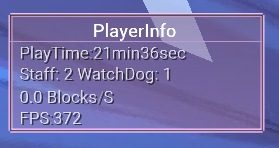
A Playerinfo full of girlishness
-
import net.ccbluex.liquidbounce.ui.client.hud.element.ElementInfo
import net.ccbluex.liquidbounce.ui.client.hud.element.Element
import net.ccbluex.liquidbounce.ui.client.hud.element.Border
import net.ccbluex.liquidbounce.utils.render.RenderUtils
import net.ccbluex.liquidbounce.features.module.modules.misc.BanChecker
import net.ccbluex.liquidbounce.ui.font.Fonts
import net.ccbluex.liquidbounce.value.BoolValue
import net.ccbluex.liquidbounce.value.FontValue
import net.ccbluex.liquidbounce.value.IntegerValue
import net.minecraft.client.Minecraft
import net.minecraft.client.renderer.GlStateManager
import org.lwjgl.opengl.GL11
import java.awt.Color


@ElementInfo(name = "PlayerInfo")
class PlayerInfo : Element() {
    var HM = 0
    var S = 0
    var M = 0
    var H = 0
    private val title = BoolValue("Title", true)
    private val fontValue = FontValue("Font", Fonts.fontRegular38)
    override fun drawElement(): Border {
        HM += 1;
        if (HM == 120) {
            S += 1;
            HM = 0;
        }
        if (S == 60) {
            M += 1
            S = 0
        }
        if (M == 60) {
            H += 1
            M = 0
        }
        val font = fontValue.get()
        val startY = if (title.get()) {
            -(6 + font.FONT_HEIGHT)
        } else {
            0
        }.toFloat()

        RenderUtils.drawBorderedRect(0F, -10F, 120F, 45F, 4F, Color(255,200,255,255).rgb, Color(255, 190, 255, 80).rgb)
        RenderUtils.drawBorderedRect(0F, -10F, 120F, 45F, 1.5F, Color(30,30,30,180).rgb, Color(255, 180, 255, 0).rgb)
        RenderUtils.drawRect(0F,2.2F,120F,3F,Color(255,190,255,230).rgb)
        RenderUtils.drawRect(0F,2.5F,120F,2F,Color(30,30,30,180).rgb)

        var BpsFloat = Math.sqrt(Math.pow(mc.thePlayer!!.posX - mc.thePlayer!!.prevPosX, 2.0) + Math.pow(mc.thePlayer!!.posZ - mc.thePlayer!!.prevPosZ, 2.0)) * 20 * mc.timer.timerSpeed
        var BpsDouble = (BpsFloat * 100 - (BpsFloat * 100) % 1) / 100

        GL11.glPushMatrix()
        GL11.glEnable(GL11.GL_BLEND)
        GL11.glDisable(GL11.GL_TEXTURE_2D)
        GL11.glBlendFunc(GL11.GL_SRC_ALPHA, GL11.GL_ONE_MINUS_SRC_ALPHA)
        GL11.glEnable(GL11.GL_LINE_SMOOTH)
        GL11.glDisable(GL11.GL_CULL_FACE)
        GL11.glShadeModel(7425)


        GL11.glBegin(GL11.GL_POLYGON)

        GlStateManager.color(0 / 255f, 0 / 255f, 0 / 255f, 60 / 255f)
        GL11.glVertex2d(0f.toDouble(), (-10f).toDouble())
        GL11.glVertex2d(120f.toDouble(), (-10f).toDouble())
        GlStateManager.color(0 / 255f, 0 / 255f, 0 / 255f, 25 / 255f)
        GL11.glVertex2d(120f.toDouble(), 44f.toDouble())
        GL11.glVertex2d(0f.toDouble(), 44f.toDouble())
        GL11.glEnd()

        GL11.glShadeModel(7424)
        GL11.glEnable(GL11.GL_TEXTURE_2D)
        GL11.glEnable(GL11.GL_CULL_FACE)
        GL11.glDisable(GL11.GL_BLEND)
        GL11.glDisable(GL11.GL_LINE_SMOOTH)
        GL11.glPopMatrix()

        Fonts.font35.drawString("PlayerInfo", 40f, -5f, Color.WHITE.rgb)
        Fonts.fontRegular32.drawString("  PlayTime§7:§f${M}min${S}sec", 1f, 6f, Color(255, 255, 255, 200).rgb, shadow = true)
        Fonts.fontRegular32.drawString("  Staff: ${BanChecker.STAFF_BAN_LAST_MIN} WatchDog: ${BanChecker.WATCHDOG_BAN_LAST_MIN}", 1f, 16f, Color(255, 255, 255, 200).rgb, shadow = true)
        Fonts.fontRegular32.drawString("  ${BpsDouble} Blocks§7/§fS", 1F, 27F, Color(255, 255, 255, 200).rgb, shadow = true)
        Fonts.fontRegular32.drawString("  FPS§7:§f${Minecraft.getDebugFPS().toString()}" + 2, 1F, 37F, Color(255, 255, 255, 200).rgb, shadow = true)

        return Border(0F, 0f, 100F, 40F)
    }
}
welcome to use it



Hello! It looks like you're interested in this conversation, but you don't have an account yet.
Getting fed up of having to scroll through the same posts each visit? When you register for an account, you'll always come back to exactly where you were before, and choose to be notified of new replies (either via email, or push notification). You'll also be able to save bookmarks and upvote posts to show your appreciation to other community members.
With your input, this post could be even better 💗
Register Login