A Form to show your own player‘s imformation
-
it is coded for chinese,if you want to get different language you can change it
import net.ccbluex.liquidbounce.ui.client.hud.element.Border
import net.ccbluex.liquidbounce.ui.client.hud.element.Element
import net.ccbluex.liquidbounce.ui.client.hud.element.ElementInfo
import net.ccbluex.liquidbounce.ui.font.Fonts
import net.ccbluex.liquidbounce.utils.render.RenderUtils
import net.minecraft.client.gui.Gui
import net.minecraft.client.renderer.GlStateManager
import net.minecraft.util.ResourceLocation
import org.lwjgl.opengl.GL11
import java.awt.Color

@ElementInfo(name = "ShowPlayerInformation")
class ShowPlayerInformation : Element() {
    override fun drawElement(): Border {
        RenderUtils.drawBorderedRect(0F, -20F, 142F, 35F, 2F, Color(40,40,40,240).rgb, Color(20, 20, 20, 60).rgb)
        RenderUtils.drawBorderedRect(0F, -20F, 142F, 35F, 0.5F, Color(255,255,255,120).rgb, Color(255, 180, 255, 0).rgb)
        RenderUtils.drawBorderedRect(0F, -10F, 142F, 35F, 2F, Color(40,40,40,240).rgb, Color(255, 190, 255, 0).rgb)
        RenderUtils.drawBorderedRect(0F, -10F, 142F, 35F, 0.5F, Color(255,255,255,120).rgb, Color(255, 180, 255, 0).rgb)
        var BpsFloat = Math.sqrt(Math.pow(mc.thePlayer!!.posX - mc.thePlayer!!.prevPosX, 2.0) + Math.pow(mc.thePlayer!!.posZ - mc.thePlayer!!.prevPosZ, 2.0)) * 20 * mc.timer.timerSpeed
        var BpsDouble = (BpsFloat * 100 - (BpsFloat * 100) % 1) / 100
        GL11.glPushMatrix()
        GL11.glEnable(GL11.GL_BLEND)
        GL11.glDisable(GL11.GL_TEXTURE_2D)
        GL11.glBlendFunc(GL11.GL_SRC_ALPHA, GL11.GL_ONE_MINUS_SRC_ALPHA)
        GL11.glEnable(GL11.GL_LINE_SMOOTH)
        GL11.glDisable(GL11.GL_CULL_FACE)
        GL11.glShadeModel(7425)

        GL11.glBegin(GL11.GL_POLYGON)

        GlStateManager.color(20 / 255f, 20 / 255f, 20 / 255f, 185 / 255f)
        GL11.glVertex2d(0f.toDouble(), (-10f).toDouble())
        GL11.glVertex2d(142f.toDouble(), (-10f).toDouble())
        GlStateManager.color(20 / 255f, 20 / 255f, 20 / 255f,20 / 255f)
        GL11.glVertex2d(142f.toDouble(), 37f.toDouble())
        GL11.glVertex2d(0f.toDouble(), 37f.toDouble())
        GL11.glEnd()

        GL11.glShadeModel(7424)
        GL11.glEnable(GL11.GL_TEXTURE_2D)
        GL11.glEnable(GL11.GL_CULL_FACE)
        GL11.glDisable(GL11.GL_BLEND)
        GL11.glDisable(GL11.GL_LINE_SMOOTH)
        GL11.glPopMatrix()

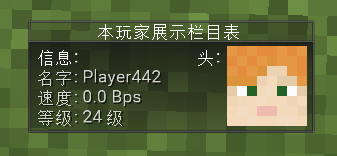
        Fonts.font35.drawString("本玩家展示栏目表",35f , -18f, Color.WHITE.rgb)
        Fonts.font35.drawString("信息:", 5f, -5f, Color.WHITE.rgb)
        Fonts.font35.drawString("头:", 85f, -5f, Color.WHITE.rgb)

        Fonts.fontRegular35.drawString("  名字: " + mc.thePlayer.name, 0.5f, 5f, Color(255, 255, 255, 200).rgb, shadow = true)
        Fonts.fontRegular35.drawString("  速度: ${BpsDouble} Bps", 0.5F, 15F, Color(255, 255, 255, 200).rgb, shadow = true)
        Fonts.fontRegular35.drawString("  等级: " + mc.thePlayer.experienceLevel + " " + "级", 0.5f, 25f, Color(255, 255, 255, 200).rgb, shadow = true)
        drawHead(skin = mc.thePlayer.locationSkin, width = 40, height = 40);
        return Border(0F, 0f, 142F,  35F)
    }
    private fun drawHead(skin: ResourceLocation, width: Int, height: Int) {
        GL11.glColor4f(1F, 1F, 1F, 1F)
        mc.textureManager.bindTexture(skin)
        Gui.drawScaledCustomSizeModalRect(99, -8, 8F, 8F, 8, 8, width, height,
                64F, 64F)
    }
}
/*
* @Coder Larissa
* welcome to use
* */
-
it is coded for chinese,if you want to get different language you can change it
import net.ccbluex.liquidbounce.ui.client.hud.element.Border import net.ccbluex.liquidbounce.ui.client.hud.element.Element import net.ccbluex.liquidbounce.ui.client.hud.element.ElementInfo import net.ccbluex.liquidbounce.ui.font.Fonts import net.ccbluex.liquidbounce.utils.render.RenderUtils import net.minecraft.client.gui.Gui import net.minecraft.client.renderer.GlStateManager import net.minecraft.util.ResourceLocation import org.lwjgl.opengl.GL11 import java.awt.Color @ElementInfo(name = "ShowPlayerInformation") class ShowPlayerInformation : Element() { override fun drawElement(): Border { RenderUtils.drawBorderedRect(0F, -20F, 142F, 35F, 2F, Color(40,40,40,240).rgb, Color(20, 20, 20, 60).rgb) RenderUtils.drawBorderedRect(0F, -20F, 142F, 35F, 0.5F, Color(255,255,255,120).rgb, Color(255, 180, 255, 0).rgb) RenderUtils.drawBorderedRect(0F, -10F, 142F, 35F, 2F, Color(40,40,40,240).rgb, Color(255, 190, 255, 0).rgb) RenderUtils.drawBorderedRect(0F, -10F, 142F, 35F, 0.5F, Color(255,255,255,120).rgb, Color(255, 180, 255, 0).rgb) var BpsFloat = Math.sqrt(Math.pow(mc.thePlayer!!.posX - mc.thePlayer!!.prevPosX, 2.0) + Math.pow(mc.thePlayer!!.posZ - mc.thePlayer!!.prevPosZ, 2.0)) * 20 * mc.timer.timerSpeed var BpsDouble = (BpsFloat * 100 - (BpsFloat * 100) % 1) / 100 GL11.glPushMatrix() GL11.glEnable(GL11.GL_BLEND) GL11.glDisable(GL11.GL_TEXTURE_2D) GL11.glBlendFunc(GL11.GL_SRC_ALPHA, GL11.GL_ONE_MINUS_SRC_ALPHA) GL11.glEnable(GL11.GL_LINE_SMOOTH) GL11.glDisable(GL11.GL_CULL_FACE) GL11.glShadeModel(7425) GL11.glBegin(GL11.GL_POLYGON) GlStateManager.color(20 / 255f, 20 / 255f, 20 / 255f, 185 / 255f) GL11.glVertex2d(0f.toDouble(), (-10f).toDouble()) GL11.glVertex2d(142f.toDouble(), (-10f).toDouble()) GlStateManager.color(20 / 255f, 20 / 255f, 20 / 255f,20 / 255f) GL11.glVertex2d(142f.toDouble(), 37f.toDouble()) GL11.glVertex2d(0f.toDouble(), 37f.toDouble()) GL11.glEnd() GL11.glShadeModel(7424) GL11.glEnable(GL11.GL_TEXTURE_2D) GL11.glEnable(GL11.GL_CULL_FACE) GL11.glDisable(GL11.GL_BLEND) GL11.glDisable(GL11.GL_LINE_SMOOTH) GL11.glPopMatrix() Fonts.font35.drawString("本玩家展示栏目表",35f , -18f, Color.WHITE.rgb) Fonts.font35.drawString("信息:", 5f, -5f, Color.WHITE.rgb) Fonts.font35.drawString("头:", 85f, -5f, Color.WHITE.rgb) Fonts.fontRegular35.drawString(" 名字: " + mc.thePlayer.name, 0.5f, 5f, Color(255, 255, 255, 200).rgb, shadow = true) Fonts.fontRegular35.drawString(" 速度: ${BpsDouble} Bps", 0.5F, 15F, Color(255, 255, 255, 200).rgb, shadow = true) Fonts.fontRegular35.drawString(" 等级: " + mc.thePlayer.experienceLevel + " " + "级", 0.5f, 25f, Color(255, 255, 255, 200).rgb, shadow = true) drawHead(skin = mc.thePlayer.locationSkin, width = 40, height = 40); return Border(0F, 0f, 142F, 35F) } private fun drawHead(skin: ResourceLocation, width: Int, height: Int) { GL11.glColor4f(1F, 1F, 1F, 1F) mc.textureManager.bindTexture(skin) Gui.drawScaledCustomSizeModalRect(99, -8, 8F, 8F, 8, 8, width, height, 64F, 64F) } } /* * @Coder Larissa * welcome to use * */ -
so good!!

Hello! It looks like you're interested in this conversation, but you don't have an account yet.
Getting fed up of having to scroll through the same posts each visit? When you register for an account, you'll always come back to exactly where you were before, and choose to be notified of new replies (either via email, or push notification). You'll also be able to save bookmarks and upvote posts to show your appreciation to other community members.
With your input, this post could be even better 💗
Register Login