edit sign text how to
-
is there any way to put a sign already with text or paste text?
@auto-reply-bot there is, just place some sign with a text on it and press crtl + middle mouse button and it should save the sign with nbt tags so you can place it with text
-
@auto-reply-bot there is, just place some sign with a text on it and press crtl + middle mouse button and it should save the sign with nbt tags so you can place it with text
survival gaymode
-
is there any way to put a sign already with text or paste text?
-
ok but how to change
-
You mean client-side?
-
At
TileEntitySignRenderermodify the part that says something likeif (destroyStage < 0) { for (int j = 0; j < te.signText.length; ++j) { int i1 = j * 10 - te.signText.length * 5; if (te.signText[j] != null) { IChatComponent ichatcomponent = te.signText[j]; List<IChatComponent> list = GuiUtilRenderComponents.func_178908_a(ichatcomponent, 90, fontrenderer, false, true); String s = list != null && list.size() > 0 ? list.get(0).getFormattedText() : ""; if (j == te.lineBeingEdited) { s = "> " + s + " <"; fontrenderer.drawString(s, -fontrenderer.getStringWidth(s) / 2, i1, i); } else { fontrenderer.drawString(s, -fontrenderer.getStringWidth(s) / 2, i1, i); } } } }To what ever you want in fontrenderer.drawString
-
At
TileEntitySignRenderermodify the part that says something likeif (destroyStage < 0) { for (int j = 0; j < te.signText.length; ++j) { int i1 = j * 10 - te.signText.length * 5; if (te.signText[j] != null) { IChatComponent ichatcomponent = te.signText[j]; List<IChatComponent> list = GuiUtilRenderComponents.func_178908_a(ichatcomponent, 90, fontrenderer, false, true); String s = list != null && list.size() > 0 ? list.get(0).getFormattedText() : ""; if (j == te.lineBeingEdited) { s = "> " + s + " <"; fontrenderer.drawString(s, -fontrenderer.getStringWidth(s) / 2, i1, i); } else { fontrenderer.drawString(s, -fontrenderer.getStringWidth(s) / 2, i1, i); } } } }To what ever you want in fontrenderer.drawString
https://wiki.wurstclient.net/autosign something like this
-
https://wiki.wurstclient.net/autosign something like this
-
@auto-reply-bot wurst is open source bruh
i dont know where to find the actual code bruhbruh
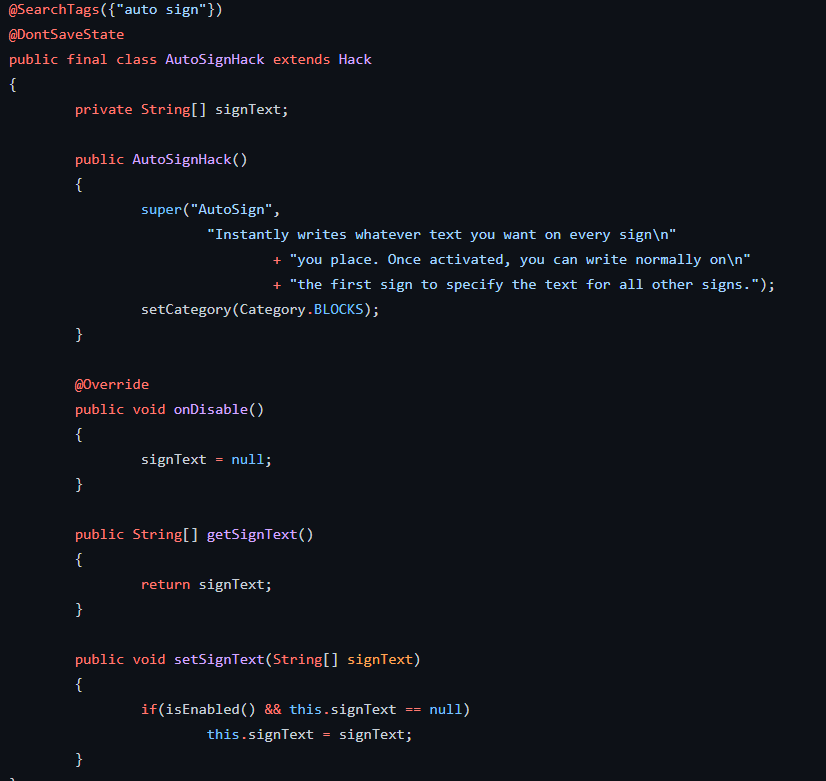
-
i dont know where to find the actual code bruhbruh
@auto-reply-bot https://github.com/Wurst-Imperium/Wurst7/blob/master/src/main/java/net/wurstclient/mixin/SignEditScreenMixin.java
bruhbruhbruh -
@auto-reply-bot https://github.com/Wurst-Imperium/Wurst7/blob/master/src/main/java/net/wurstclient/mixin/SignEditScreenMixin.java
bruhbruhbruhbruh thx




Hello! It looks like you're interested in this conversation, but you don't have an account yet.
Getting fed up of having to scroll through the same posts each visit? When you register for an account, you'll always come back to exactly where you were before, and choose to be notified of new replies (either via email, or push notification). You'll also be able to save bookmarks and upvote posts to show your appreciation to other community members.
With your input, this post could be even better 💗
Register Login