how to import legacy liquidbounce into idea
-
can someone write a full tutorial on how to import legacy liquidbounce into idea and run
-
- https://github.com/CCBlueX/LiquidBounce/tree/legacy download zip
- Download gradle https://gradle.org/releases/ like https://www.youtube.com/watch?v=_XcO_BujfeQ
- open in intellij this project and click "Load as gradle project"
-
- https://github.com/CCBlueX/LiquidBounce/tree/legacy download zip
- Download gradle https://gradle.org/releases/ like https://www.youtube.com/watch?v=_XcO_BujfeQ
- open in intellij this project and click "Load as gradle project"
@der do I need to write something in the terminal?
-
@der do I need to write something in the terminal?
- cd into the legacy folder wirte than in the terminal gradlew --debug setupDevWorkspace idea genIntellijRuns build
- open in intellij this project and click "Load as gradle project"
xD
-
- cd into the legacy folder wirte than in the terminal gradlew --debug setupDevWorkspace idea genIntellijRuns build
- open in intellij this project and click "Load as gradle project"
xD
@der Cannot start process, the working directory
LiquidBounce-legacy\LiquidBounce-legacy\1.8.9-Forge\rundoes not exist
-
@der Cannot start process, the working directory
LiquidBounce-legacy\LiquidBounce-legacy\1.8.9-Forge\rundoes not exist
@coolguy_yt_2010 create a folder with the name "run" in LiquidBounce-legacy\LiquidBounce-legacy\1.8.9-Forge
-
@coolguy_yt_2010 create a folder with the name "run" in LiquidBounce-legacy\LiquidBounce-legacy\1.8.9-Forge
@der
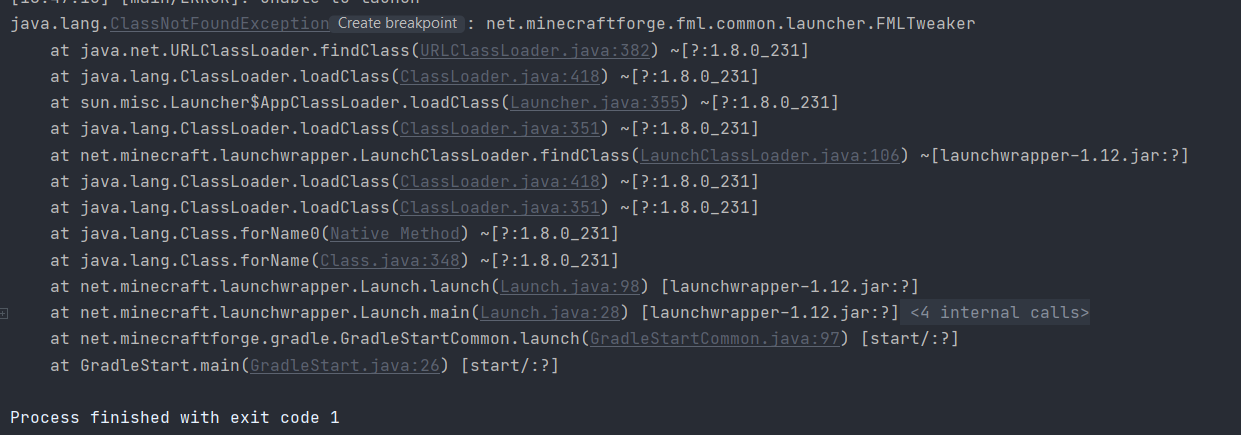
-
@coolguy_yt_2010 create a folder with the name "run" in LiquidBounce-legacy\LiquidBounce-legacy\1.8.9-Forge
This post is deleted! -
@coolguy_yt_2010 create a folder with the name "run" in LiquidBounce-legacy\LiquidBounce-legacy\1.8.9-Forge
@der so i made a mistake, you have to open cmd and cd into this folder with all files in and write "gradlew --debug setupDevWorkspace idea genIntellijRuns build" so delete this folder and make a new one
only open intellij when you are finished and than you can import this project -
@der so i made a mistake, you have to open cmd and cd into this folder with all files in and write "gradlew --debug setupDevWorkspace idea genIntellijRuns build" so delete this folder and make a new one
only open intellij when you are finished and than you can import this project -
@Der

@coolguy_yt_2010 try again to start if not work go to 1.8.9-Forge build.gradle line 93 and replace
compile 'com.github.TheAltening:TheAltening4j:api-2.0-22541fa70f-1' with compile 'com.github.TheAltening:TheAltening4j:-SNAPSHOT' -
@coolguy_yt_2010 try again to start if not work go to 1.8.9-Forge build.gradle line 93 and replace
compile 'com.github.TheAltening:TheAltening4j:api-2.0-22541fa70f-1' with compile 'com.github.TheAltening:TheAltening4j:-SNAPSHOT'@der said in how to import legacy liquidbounce into idea:
replace
compile 'com.github.TheAltening:TheAltening4j:api-2.0-22541fa70f-1' with compile 'com.github.TheAltening:TheAltening4j:-SNAPSHOT'thanks

Hello! It looks like you're interested in this conversation, but you don't have an account yet.
Getting fed up of having to scroll through the same posts each visit? When you register for an account, you'll always come back to exactly where you were before, and choose to be notified of new replies (either via email, or push notification). You'll also be able to save bookmarks and upvote posts to show your appreciation to other community members.
With your input, this post could be even better 💗
Register Login