A long shape of the template TargetHUD
-
it just a Mould,you can add other decorations on it by yourself!
这只是一个模板,你可以自己加上其他装饰!
package net.ccbluex.liquidbounce.ui.client.hud.element.elements

import net.ccbluex.liquidbounce.LiquidBounce
import net.ccbluex.liquidbounce.features.module.modules.combat.KillAura
import net.ccbluex.liquidbounce.ui.client.hud.element.Border
import net.ccbluex.liquidbounce.ui.client.hud.element.Element
import net.ccbluex.liquidbounce.ui.client.hud.element.ElementInfo
import net.ccbluex.liquidbounce.ui.font.Fonts
import net.ccbluex.liquidbounce.utils.render.RenderUtils
import net.ccbluex.liquidbounce.value.FloatValue
import net.minecraft.client.gui.Gui
import net.minecraft.entity.Entity
import net.minecraft.entity.player.EntityPlayer
import net.minecraft.util.ResourceLocation
import org.lwjgl.opengl.GL11
import java.awt.Color
import kotlin.math.abs
import kotlin.math.pow

/**
 * A target hud
 */
@ElementInfo(name = "Target3")
class Target3 : Element() {

    private val fadeSpeed = FloatValue("AnimationsSpeed", 2F, 1F, 10F)
    private var easingHealth: Float = 0F
    private var lastTarget: Entity? = null

    override fun drawElement(): Border {
        val target = (LiquidBounce.moduleManager[KillAura::class.java] as KillAura).target

        if (target is EntityPlayer) {
            if (target != lastTarget || easingHealth < 0 || easingHealth > target.maxHealth ||
                    abs(easingHealth - target.health) < 0.01) {
                easingHealth = target.health
            }

            val width = (38 + Fonts.font40.getStringWidth(target.name))
                    .coerceAtLeast(118)
                    .toFloat()

            RenderUtils.drawBorderedRect(0F, 0F, width, 35.8F, 0F,Color(0,0,0,0).rgb,Color(0,0,0,220).rgb)
            RenderUtils.drawBorderedRect(0F, 0F, width, 35.8F, 1.2F, Color(255,255,255,250).rgb,Color(0,0,0,0).rgb)
            RenderUtils.drawBorderedRect(37F, 3.2F,113F + 0f, 32.8F, 0.8F, Color(255,255,255,240).rgb,Color(0,0,0,0).rgb)
            RenderUtils.drawRect(37F, 3.2F,113F + 0f, 32.8F, Color(70,70,70,230).rgb)

            if (easingHealth > target.health)
                RenderUtils.drawRect(37F, 3.2F, (target.health / target.maxHealth) * width -3.5F,
                        32.8F, Color(138, 60, 65).rgb)

            if(target.hurtTime > 9){
                RenderUtils.drawRect(37F, 3.2F, (target.health / target.maxHealth) * width -3.5F,
                        32.8F, Color(149, 9, 17).rgb)
            } else {
                RenderUtils.drawRect(37F, 3.2F, (target.health / target.maxHealth) * width + -3.5F,
                        32.8F, Color(255, 255, 255,240).rgb)
                Fonts.fontBold35.drawStringWithShadow("HP:${(target.getHealth())}0", 57F, 15F, Color(0,0,0,0).rgb)
            }
            easingHealth += ((target.health - easingHealth) / 2.0F.pow(10.0F - fadeSpeed.get())) * RenderUtils.deltaTime
            val playerInfo = mc.netHandler.getPlayerInfo(target.uniqueID)
            if (playerInfo != null) {
                val locationSkin = playerInfo.locationSkin
                drawHead(locationSkin, 32, 32)
            }
        }
        lastTarget = target
        return Border(0F, 0F, 120F, 36F)
    }
    private fun drawHead(skin: ResourceLocation, width: Int, height: Int) {
        GL11.glColor4f(1F, 1F, 1F, 1F)
        mc.textureManager.bindTexture(skin)
        Gui.drawScaledCustomSizeModalRect(2, 2, 8F, 8F, 8, 8, width, height,
                64F, 64F)
    }
//codes larissa
}
it is the finished product:
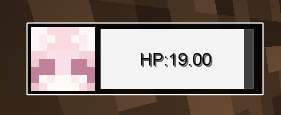
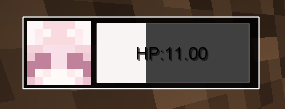
-
it just a Mould,you can add other decorations on it by yourself!
这只是一个模板,你可以自己加上其他装饰! package net.ccbluex.liquidbounce.ui.client.hud.element.elements import net.ccbluex.liquidbounce.LiquidBounce import net.ccbluex.liquidbounce.features.module.modules.combat.KillAura import net.ccbluex.liquidbounce.ui.client.hud.element.Border import net.ccbluex.liquidbounce.ui.client.hud.element.Element import net.ccbluex.liquidbounce.ui.client.hud.element.ElementInfo import net.ccbluex.liquidbounce.ui.font.Fonts import net.ccbluex.liquidbounce.utils.render.RenderUtils import net.ccbluex.liquidbounce.value.FloatValue import net.minecraft.client.gui.Gui import net.minecraft.entity.Entity import net.minecraft.entity.player.EntityPlayer import net.minecraft.util.ResourceLocation import org.lwjgl.opengl.GL11 import java.awt.Color import kotlin.math.abs import kotlin.math.pow /** * A target hud */ @ElementInfo(name = "Target3") class Target3 : Element() { private val fadeSpeed = FloatValue("AnimationsSpeed", 2F, 1F, 10F) private var easingHealth: Float = 0F private var lastTarget: Entity? = null override fun drawElement(): Border { val target = (LiquidBounce.moduleManager[KillAura::class.java] as KillAura).target if (target is EntityPlayer) { if (target != lastTarget || easingHealth < 0 || easingHealth > target.maxHealth || abs(easingHealth - target.health) < 0.01) { easingHealth = target.health } val width = (38 + Fonts.font40.getStringWidth(target.name)) .coerceAtLeast(118) .toFloat() RenderUtils.drawBorderedRect(0F, 0F, width, 35.8F, 0F,Color(0,0,0,0).rgb,Color(0,0,0,220).rgb) RenderUtils.drawBorderedRect(0F, 0F, width, 35.8F, 1.2F, Color(255,255,255,250).rgb,Color(0,0,0,0).rgb) RenderUtils.drawBorderedRect(37F, 3.2F,113F + 0f, 32.8F, 0.8F, Color(255,255,255,240).rgb,Color(0,0,0,0).rgb) RenderUtils.drawRect(37F, 3.2F,113F + 0f, 32.8F, Color(70,70,70,230).rgb) if (easingHealth > target.health) RenderUtils.drawRect(37F, 3.2F, (target.health / target.maxHealth) * width -3.5F, 32.8F, Color(138, 60, 65).rgb) if(target.hurtTime > 9){ RenderUtils.drawRect(37F, 3.2F, (target.health / target.maxHealth) * width -3.5F, 32.8F, Color(149, 9, 17).rgb) } else { RenderUtils.drawRect(37F, 3.2F, (target.health / target.maxHealth) * width + -3.5F, 32.8F, Color(255, 255, 255,240).rgb) Fonts.fontBold35.drawStringWithShadow("HP:${(target.getHealth())}0", 57F, 15F, Color(0,0,0,0).rgb) } easingHealth += ((target.health - easingHealth) / 2.0F.pow(10.0F - fadeSpeed.get())) * RenderUtils.deltaTime val playerInfo = mc.netHandler.getPlayerInfo(target.uniqueID) if (playerInfo != null) { val locationSkin = playerInfo.locationSkin drawHead(locationSkin, 32, 32) } } lastTarget = target return Border(0F, 0F, 120F, 36F) } private fun drawHead(skin: ResourceLocation, width: Int, height: Int) { GL11.glColor4f(1F, 1F, 1F, 1F) mc.textureManager.bindTexture(skin) Gui.drawScaledCustomSizeModalRect(2, 2, 8F, 8F, 8, 8, width, height, 64F, 64F) } //codes larissa }it is the finished product:
Hello! It looks like you're interested in this conversation, but you don't have an account yet.
Getting fed up of having to scroll through the same posts each visit? When you register for an account, you'll always come back to exactly where you were before, and choose to be notified of new replies (either via email, or push notification). You'll also be able to save bookmarks and upvote posts to show your appreciation to other community members.
With your input, this post could be even better 💗
Register Login