[Kotlin] KeyStrokes
-
@mateusz modify liquidbounce code
-
@mateusz sell your soul to the demon
-
wtf sigma hator
-
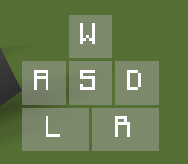
a simple keystrokes
animation like skidma
pic
package net.ccbluex.liquidbounce.ui.client.hud.element.elements

import net.ccbluex.liquidbounce.ui.client.hud.element.Border
import net.ccbluex.liquidbounce.ui.client.hud.element.Element
import net.ccbluex.liquidbounce.ui.client.hud.element.ElementInfo
import net.ccbluex.liquidbounce.ui.client.hud.element.Side
import net.ccbluex.liquidbounce.ui.font.Fonts
import net.ccbluex.liquidbounce.utils.render.ColorUtils
import net.ccbluex.liquidbounce.utils.render.RenderUtils
import net.ccbluex.liquidbounce.value.BoolValue
import net.ccbluex.liquidbounce.value.FloatValue
import net.ccbluex.liquidbounce.value.FontValue
import net.ccbluex.liquidbounce.value.IntegerValue
import net.minecraft.client.gui.FontRenderer
import net.minecraft.client.settings.KeyBinding
import org.lwjgl.input.Keyboard
import java.awt.Color

@ElementInfo(name = "KeyStrokes")
class KeyStrokes : Element(5.0,25.0,1.25F, Side.default()) {
    private val keys=ArrayList<KeyStroke>()

    private val backGroundRedValue = IntegerValue("BackGroundRed", 0, 0, 255)
    private val backGroundGreenValue = IntegerValue("BackGroundGreen", 0, 0, 255)
    private val backGroundBlueValue = IntegerValue("BackGroundBlue", 0, 0, 255)
    private val backGroundAlphaValue = IntegerValue("BackGroundAlpha", 170, 0, 255)
    private val textRedValue = IntegerValue("TextRed", 255, 0, 255)
    private val textGreenValue = IntegerValue("TextGreen", 255, 0, 255)
    private val textBlueValue = IntegerValue("TextBlue", 255, 0, 255)
    private val textAlphaValue = IntegerValue("TextAlpha", 255, 0, 255)
    private val highLightPercent = FloatValue("HighLightPercent",0.5F,0F,1F)
    private val animSpeedValue = IntegerValue("AnimationSpeed", 300, 0, 700)
    private val outline = BoolValue("Outline", false)
    private val outlineBoldValue = IntegerValue("OutlineBold", 1,0,5)
    private val outlineRainbow = BoolValue("OutLineRainbow", false)
    private val fontValue = FontValue("Font", Fonts.font35)

    init {
        keys.add(KeyStroke(mc.gameSettings.keyBindForward,16,0,15,15).initKeyName())
        keys.add(KeyStroke(mc.gameSettings.keyBindLeft,0,16,15,15).initKeyName())
        keys.add(KeyStroke(mc.gameSettings.keyBindBack,16,16,15,15).initKeyName())
        keys.add(KeyStroke(mc.gameSettings.keyBindRight,32,16,15,15).initKeyName())
        keys.add(KeyStroke(mc.gameSettings.keyBindAttack,0,32,23,15).initKeyName("L"))
        keys.add(KeyStroke(mc.gameSettings.keyBindUseItem,24,32,23,15).initKeyName("R"))
    }

    override fun drawElement(partialTicks: Float): Border {
        val backGroundColor=Color(backGroundRedValue.get(),backGroundGreenValue.get(),backGroundBlueValue.get(),backGroundAlphaValue.get())
        val textColor=if(outlineRainbow.get()){
            ColorUtils.rainbow(textAlphaValue.get())
        }else{
            Color(textRedValue.get(),textGreenValue.get(),textBlueValue.get(),textAlphaValue.get())
        }

        for(keyStroke in keys){
            keyStroke.render(animSpeedValue.get(), backGroundColor, textColor, highLightPercent.get(), outline.get(), outlineBoldValue.get(), fontValue.get())
        }

        return Border(0F,0F,47F,47F)
    }
}

class KeyStroke(val key:KeyBinding,val posX:Int,val posY:Int, val width:Int, val height:Int){
    var keyName="KEY"

    private var lastClick=false
    private val animations=ArrayList<Long>()

    fun render(speed: Int, bgColor: Color, textColor: Color, highLightPct: Float, outline: Boolean, outlineBold: Int, font: FontRenderer){
        val highLightColor=Color(255-((255-bgColor.red)*highLightPct).toInt(),255-((255-bgColor.blue)*highLightPct).toInt(),255-((255-bgColor.green)*highLightPct).toInt())
        val clickAlpha=255-(255-bgColor.alpha)*highLightPct
        val centerX=posX+(width/2)
        val centerY=posY+(height/2)
        val nowTime=System.currentTimeMillis()

        val rectColor=if(lastClick&&animations.isEmpty()){ ColorUtils.reAlpha(highLightColor,clickAlpha.toInt()) }else{ bgColor }
        RenderUtils.drawRect(posX.toFloat(),posY.toFloat(),(posX+width).toFloat(),(posY+height).toFloat()
            ,rectColor)

        val removeAble=ArrayList<Long>()
        for(time in animations){
            val pct=(nowTime-time)/(speed.toFloat())
            if(pct>1){
                removeAble.add(time)
                continue
            }
            RenderUtils.drawLimitedCircle(posX.toFloat(),posY.toFloat(),(posX+width).toFloat(),(posY+height).toFloat(),
                centerX,centerY,(width*0.7F)*pct
                ,Color(255-((255-highLightColor.red)*pct).toInt(),255-((255-highLightColor.green)*pct).toInt(),255-((255-highLightColor.blue)*pct).toInt(),255-((255-clickAlpha)*pct).toInt()))
        }
        for(time in removeAble){
            animations.remove(time)
        }
        if(!lastClick && key.isKeyDown){
            animations.add(nowTime)
        }
        lastClick=key.isKeyDown

        font.drawString(keyName,centerX-(font.getStringWidth(keyName)/2),centerY-(font.FONT_HEIGHT/2)
            ,textColor.rgb)
        if(outline){
            RenderUtils.drawRect(posX.toFloat(),posY.toFloat(),(posX+outlineBold).toFloat(),(posY+height).toFloat(),textColor.rgb)
            RenderUtils.drawRect((posX+width-outlineBold).toFloat(),posY.toFloat(),(posX+width).toFloat(),(posY+height).toFloat(),textColor.rgb)
            RenderUtils.drawRect((posX+outlineBold).toFloat(),posY.toFloat(),(posX+width-outlineBold).toFloat(),(posY+outlineBold).toFloat(),textColor.rgb)
            RenderUtils.drawRect((posX+outlineBold).toFloat(),(posY+height-outlineBold).toFloat(),(posX+width-outlineBold).toFloat(),(posY+height).toFloat(),textColor.rgb)
        }
    }

    fun initKeyName():KeyStroke{
        keyName=Keyboard.getKeyName(key.keyCode)
        return this
    }

    fun initKeyName(name:String):KeyStroke{
        keyName=name
        return this
    }
}
depends
ColorUtils@JvmStatic fun reAlpha(color: Color,alpha: Int): Color{ return Color(color.red,color.green,color.blue,alpha) }RenderUtils
public static void drawLimitedCircle(final float lx, final float ly, final float x2, final float y2,final int xx, final int yy, final float radius, final Color color) { int sections = 50; double dAngle = 2 * Math.PI / sections; float x, y; glPushAttrib(GL_ENABLE_BIT); glEnable(GL_BLEND); glDisable(GL_TEXTURE_2D); glBlendFunc(GL_SRC_ALPHA, GL_ONE_MINUS_SRC_ALPHA); glEnable(GL_LINE_SMOOTH); glBegin(GL_TRIANGLE_FAN); for (int i = 0; i < sections; i++) { x = (float) (radius * Math.sin((i * dAngle))); y = (float) (radius * Math.cos((i * dAngle))); glColor4f(color.getRed() / 255F, color.getGreen() / 255F, color.getBlue() / 255F, color.getAlpha() / 255F); glVertex2f(Math.min(x2,Math.max(xx + x,lx)), Math.min(y2,Math.max(yy + y,ly))); } GlStateManager.color(0, 0, 0); glEnd(); glPopAttrib(); } -
-
@brbb It's not about keystrokes mod, but whether the autoclicker supports it or not. If your autoclicker doesn't support clicking through keystrokes, that's the fault of autoclicker not the keystrokes.
@natalka when the me the explain today download the when in the moment the online server me minecraft r
-
@brbb It's not about keystrokes mod, but whether the autoclicker supports it or not. If your autoclicker doesn't support clicking through keystrokes, that's the fault of autoclicker not the keystrokes.
-
@natalka oh ok, but i dont use any autoclickers i just use the built in autoclicker in liquid bounce so i thought it would work with this script.
@brbb it only detects your keyboard and mouse changes
anyway it works with Physical Autoclicker





Hello! It looks like you're interested in this conversation, but you don't have an account yet.
Getting fed up of having to scroll through the same posts each visit? When you register for an account, you'll always come back to exactly where you were before, and choose to be notified of new replies (either via email, or push notification). You'll also be able to save bookmarks and upvote posts to show your appreciation to other community members.
With your input, this post could be even better 💗
Register Login