Skip to content
  • Categories
  • Recent
  • Tags
  • Popular
  • Users
  • Groups
Skins
  • Light
  • Brite
  • Cerulean
  • Cosmo
  • Flatly
  • Journal
  • Litera
  • Lumen
  • Lux
  • Materia
  • Minty
  • Morph
  • Pulse
  • Sandstone
  • Simplex
  • Sketchy
  • Spacelab
  • United
  • Yeti
  • Zephyr
  • Dark
  • Cyborg
  • Darkly
  • Quartz
  • Slate
  • Solar
  • Superhero
  • Vapor

  • Default (No Skin)
  • No Skin
Collapse

LiquidBounce Forum

  1. Home
  2. Kotlin/Java
  3. [REQUEST] Java

[REQUEST] Java

Scheduled Pinned Locked Moved Kotlin/Java
17 Posts 9 Posters 4.3k Views
  • Oldest to Newest
  • Newest to Oldest
  • Most Votes
Reply
  • Reply as topic
Log in to reply
This topic has been deleted. Only users with topic management privileges can see it.
  • Zhao YunZ Zhao Yun

    @neptunenoodles @caex @icewormy3 but how do I indicate that I want to find a bow?

    ? Offline
    ? Offline
    A Former User
    wrote on last edited by
    #7

    @zhao-yun val slot = (0..8).firstOrNull { player.inventory.getStack(it).item == Items.BOW } ?: return@repeatable if (slot != player.inventory.selectedSlot) { network.sendPacket(UpdateSelectedSlotC2SPacket(slot)) }

    Zhao YunZ 2 Replies Last reply
    0
    • ? A Former User

      @zhao-yun val slot = (0..8).firstOrNull { player.inventory.getStack(it).item == Items.BOW } ?: return@repeatable if (slot != player.inventory.selectedSlot) { network.sendPacket(UpdateSelectedSlotC2SPacket(slot)) }

      Zhao YunZ Offline
      Zhao YunZ Offline
      Zhao Yun
      wrote on last edited by
      #8

      @mems Does not work. You can give all the code in its normal form, I have already tried everything ?

      exit scammedE 1 Reply Last reply
      0
      • Zhao YunZ Zhao Yun

        @mems Does not work. You can give all the code in its normal form, I have already tried everything ?

        exit scammedE Offline
        exit scammedE Offline
        exit scammed
        wrote on last edited by
        #9

        @zhao-yun this may help you

        1,2. mc src

        Zhao YunZ 1 Reply Last reply
        0
        • exit scammedE exit scammed

          @zhao-yun this may help you

          1,2. mc src

          Zhao YunZ Offline
          Zhao YunZ Offline
          Zhao Yun
          wrote on last edited by
          #10

          @____ what is it?

          1 Reply Last reply
          0
          • ? A Former User

            @zhao-yun val slot = (0..8).firstOrNull { player.inventory.getStack(it).item == Items.BOW } ?: return@repeatable if (slot != player.inventory.selectedSlot) { network.sendPacket(UpdateSelectedSlotC2SPacket(slot)) }

            Zhao YunZ Offline
            Zhao YunZ Offline
            Zhao Yun
            wrote on last edited by
            #11

            @mems what code is needed for the player to press button 2

            1 Reply Last reply
            0
            • icewormy3I icewormy3

              1: mc.thePlayer.inventory.currentItem = slot (min 0, max 8 )
              2: send a rotation packet

              Zhao YunZ Offline
              Zhao YunZ Offline
              Zhao Yun
              wrote on last edited by
              #12

              @icewormy3
              I decided to write in such a way to understand how the command works

              Screenshot_2.png
              But nothing is displayed in the chat when the bow is in the hot slot

              1 Reply Last reply
              0
              • 6Sence6 6Sence

                best way to change yaw and pitch is to change event.yaw and pitch in motion event

                ? Offline
                ? Offline
                A Former User
                wrote on last edited by
                #13

                @6sence said in [REQUEST] Java:

                best way to change yaw and pitch is to change event.yaw and pitch in motion event
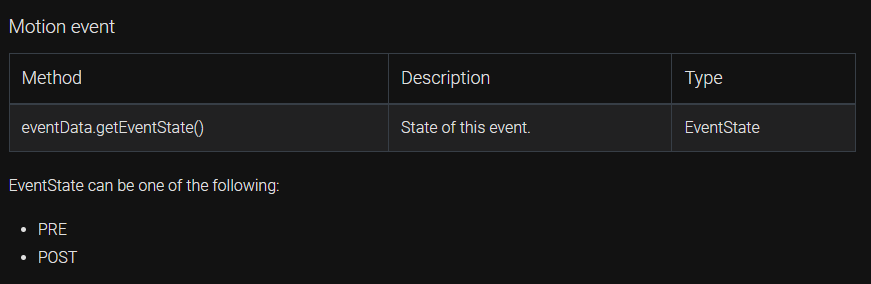
                chrome_5xnDtpiwp4.png

                this is not intent base tutorial client bro

                the real way is:

                RotationUtils.setTargetRotation(new Rotation(yaw,pitch)) // normal way
                
                RotationUtils.setTargetRotation(new Rotation(yaw,pitch),keepLength) // the keepLength parameter is like KeepRotationsLength setting in scaffold
                
                6Sence6 1 Reply Last reply
                0
                • ? A Former User

                  @6sence said in [REQUEST] Java:

                  best way to change yaw and pitch is to change event.yaw and pitch in motion event

                  chrome_5xnDtpiwp4.png

                  this is not intent base tutorial client bro

                  the real way is:

                  RotationUtils.setTargetRotation(new Rotation(yaw,pitch)) // normal way
                  
                  RotationUtils.setTargetRotation(new Rotation(yaw,pitch),keepLength) // the keepLength parameter is like KeepRotationsLength setting in scaffold
                  
                  6Sence6 Offline
                  6Sence6 Offline
                  6Sence
                  wrote on last edited by 6Sence
                  #14

                  @chocopiexd said in [REQUEST] Java:

                  @6sence said in [REQUEST] Java:

                  best way to change yaw and pitch is to change event.yaw and pitch in motion event

                  chrome_5xnDtpiwp4.png

                  this is not intent base tutorial client bro

                  the real way is:

                  RotationUtils.setTargetRotation(new Rotation(yaw,pitch)) // normal way
                  
                  RotationUtils.setTargetRotation(new Rotation(yaw,pitch),keepLength) // the keepLength parameter is like KeepRotationsLength setting in scaffold
                  

                  smartarse event as in the litteral Event is in every base and if it doesn't have it I wouldn't consider it as a base since every other method is detectable.

                  ? 1 Reply Last reply
                  0
                  • 6Sence6 6Sence

                    @chocopiexd said in [REQUEST] Java:

                    @6sence said in [REQUEST] Java:

                    best way to change yaw and pitch is to change event.yaw and pitch in motion event

                    chrome_5xnDtpiwp4.png

                    this is not intent base tutorial client bro

                    the real way is:

                    RotationUtils.setTargetRotation(new Rotation(yaw,pitch)) // normal way
                    
                    RotationUtils.setTargetRotation(new Rotation(yaw,pitch),keepLength) // the keepLength parameter is like KeepRotationsLength setting in scaffold
                    

                    smartarse event as in the litteral Event is in every base and if it doesn't have it I wouldn't consider it as a base since every other method is detectable.

                    ? Offline
                    ? Offline
                    A Former User
                    wrote on last edited by
                    #15

                    @6sence said in [REQUEST] Java:

                    @chocopiexd said in [REQUEST] Java:

                    @6sence said in [REQUEST] Java:

                    best way to change yaw and pitch is to change event.yaw and pitch in motion event

                    chrome_5xnDtpiwp4.png

                    this is not intent base tutorial client bro

                    the real way is:

                    RotationUtils.setTargetRotation(new Rotation(yaw,pitch)) // normal way
                    
                    RotationUtils.setTargetRotation(new Rotation(yaw,pitch),keepLength) // the keepLength parameter is like KeepRotationsLength setting in scaffold
                    

                    smartarse event as in the litteral Event is in every base and if it doesn't have it I wouldn't consider it as a base since every other method is detectable.

                    not every base is the same
                    in most base:
                    event.setYaw(yaw) and event.setPitch(pitch)
                    in liquidbounce:
                    RotationUtils.setTargetRotation(new Rotation(yaw,pitch))

                    these 2 methods are the same, basically modifying the yaw and pitch value when sending player packets


                    6Sence6 1 Reply Last reply
                    0
                    • Q Offline
                      Q Offline
                      quadro
                      wrote on last edited by
                      #16

                      the last 3 posts are stupid ^^

                      1 Reply Last reply
                      0
                      • ? A Former User

                        @6sence said in [REQUEST] Java:

                        @chocopiexd said in [REQUEST] Java:

                        @6sence said in [REQUEST] Java:

                        best way to change yaw and pitch is to change event.yaw and pitch in motion event

                        chrome_5xnDtpiwp4.png

                        this is not intent base tutorial client bro

                        the real way is:

                        RotationUtils.setTargetRotation(new Rotation(yaw,pitch)) // normal way
                        
                        RotationUtils.setTargetRotation(new Rotation(yaw,pitch),keepLength) // the keepLength parameter is like KeepRotationsLength setting in scaffold
                        

                        smartarse event as in the litteral Event is in every base and if it doesn't have it I wouldn't consider it as a base since every other method is detectable.

                        not every base is the same
                        in most base:
                        event.setYaw(yaw) and event.setPitch(pitch)
                        in liquidbounce:
                        RotationUtils.setTargetRotation(new Rotation(yaw,pitch))

                        these 2 methods are the same, basically modifying the yaw and pitch value when sending player packets

                        6Sence6 Offline
                        6Sence6 Offline
                        6Sence
                        wrote on last edited by
                        #17

                        @chocopiexd exactly they're the same so why you being a smartarse about me helping zhao?

                        1 Reply Last reply
                        0

                        Hello! It looks like you're interested in this conversation, but you don't have an account yet.

                        Getting fed up of having to scroll through the same posts each visit? When you register for an account, you'll always come back to exactly where you were before, and choose to be notified of new replies (either via email, or push notification). You'll also be able to save bookmarks and upvote posts to show your appreciation to other community members.

                        With your input, this post could be even better 💗

                        Register Login
                        Reply
                        • Reply as topic
                        Log in to reply
                        • Oldest to Newest
                        • Newest to Oldest
                        • Most Votes


                        About
                        • Terms of Service
                        • Privacy Policy
                        • Status
                        • Contact Us
                        Downloads
                        • Releases
                        • Source code
                        • License
                        Docs
                        • Tutorials
                        • CustomHUD
                        • AutoSettings
                        • ScriptAPI
                        Community
                        • Forum
                        • Guilded
                        • YouTube
                        • Twitter
                        • D.Tube
                        • Login

                        • Login or register to search.
                        • First post
                          Last post
                        0
                        • Categories
                        • Recent
                        • Tags
                        • Popular
                        • Users
                        • Groups