Skip to content
  • Categories
  • Recent
  • Tags
  • Popular
  • Users
  • Groups
Skins
  • Light
  • Cerulean
  • Cosmo
  • Flatly
  • Journal
  • Litera
  • Lumen
  • Lux
  • Materia
  • Minty
  • Morph
  • Pulse
  • Sandstone
  • Simplex
  • Sketchy
  • Spacelab
  • United
  • Yeti
  • Zephyr
  • Dark
  • Cyborg
  • Darkly
  • Quartz
  • Slate
  • Solar
  • Superhero
  • Vapor

  • Default (No Skin)
  • No Skin
Collapse

LiquidBounce Forum

  1. Home
  2. Resources
  3. Scripts
  4. [Script] NES Emulator

[Script] NES Emulator

Scheduled Pinned Locked Moved Scripts
3 Posts 1 Posters 1.4k Views
  • Oldest to Newest
  • Newest to Oldest
  • Most Votes
Reply
  • Reply as topic
Log in to reply
This topic has been deleted. Only users with topic management privileges can see it.
  • kawaiinekololisK Offline
    kawaiinekololisK Offline
    kawaiinekololis
    Admin
    wrote on last edited by kawaiinekololis
    #1

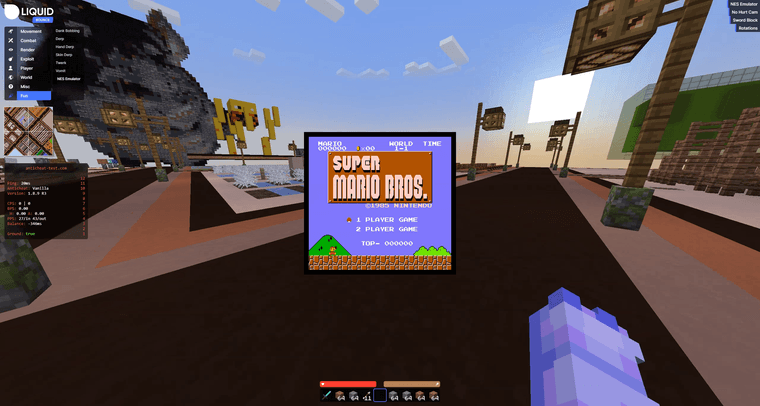
    vlcsnap-2024-11-06-05h39m14s168.png

    With this script, games developed for the Nintendo Entertainment System (NES) can be played directly in LiquidBounce. Based on JSNES by bfirsh. A demo video on YouTube can be found here.

    Video
    NES Emulator on LiquidBounce Nextgen – 01:08
    — CCBlueX

    How to use

    1. Place the nes_emulator folder into your scripts folder.
    2. Navigate into the nes_emulator folder and put you NES games into the roms folder.
    3. Launch LiquidBounce, right click NESEmulator inside the ClickGUI and select the game you want to play.
    4. Enable NESEmulator.

    Important! Performance might be terrible at first. It will improve once hot code compilation kicks in.

    Default Keybinds

    NES button Keyboard Bind
    A Z
    B X
    Select C
    Start V
    Up Arrow Up
    Down Arrow Down
    Left Arrow Left
    Right Arrow Right

    Download
    LiquidBounce_nes_emulator_Minecraft_1_21_11.zip

    1 Reply Last reply
    0
    • kawaiinekololisK Offline
      kawaiinekololisK Offline
      kawaiinekololis
      Admin
      wrote on last edited by
      #2

      This script is compatible starting with https://github.com/CCBlueX/LiquidBounce/commit/7ca6ce4bd4500950c48d8a335634ab5092155a1f - do not use on 0.17.0. Wait for 0.18.0 to be released.

      0 1zun4 committed to CCBlueX/LiquidBounce
      feat: key option (#4373)
      
      Similiar to Bind but only stores Key.
      
      ---------
      
      Co-authored-by: Senk Ju <[email protected]>
      1 Reply Last reply
      0
      • kawaiinekololisK Offline
        kawaiinekololisK Offline
        kawaiinekololis
        Admin
        wrote last edited by
        #3

        The script has been updated for Minecraft 1.21.11. The download can be found on the main post.
        Changes: https://github.com/CCBlueX/ScriptAPI/commit/1fd1064a542036f49cd8157546860825aff41e8f

        0 MukjepScarlet committed to CCBlueX/ScriptAPI
        fix(NESEmulator): update to 1.21.11 (#38)
        
        * fix(NESEmulator): update to 1.21.11
        
        * Make x/y always floored
        
        * fix
        
        * add scale setting
        
        * dont use ints when not necessary
        
        ---------
        
        Co-authored-by: Senk Ju <[email protected]>
        1 Reply Last reply
        0
        Reply
        • Reply as topic
        Log in to reply
        • Oldest to Newest
        • Newest to Oldest
        • Most Votes


        About
        • Terms of Service
        • Privacy Policy
        • Status
        • Contact Us
        Downloads
        • Releases
        • Source code
        • License
        Docs
        • Tutorials
        • CustomHUD
        • AutoSettings
        • ScriptAPI
        Community
        • Forum
        • Guilded
        • YouTube
        • Twitter
        • D.Tube
        • Login

        • Login or register to search.
        • First post
          Last post
        0
        • Categories
        • Recent
        • Tags
        • Popular
        • Users
        • Groups