[Script] NES Emulator

-
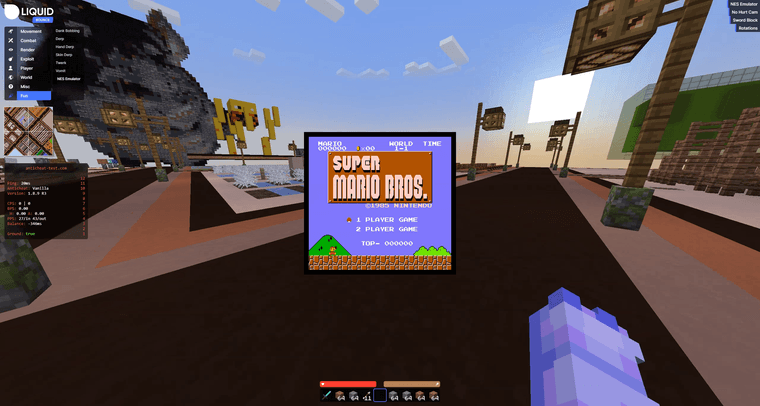
With this script, games developed for the Nintendo Entertainment System (NES) can be played directly in LiquidBounce. Based on JSNES by bfirsh. A demo video on YouTube can be found here.
Video
NES Emulator on LiquidBounce Nextgen – 01:08
— CCBlueXHow to use
- Place the
nes_emulatorfolder into yourscriptsfolder. - Navigate into the
nes_emulatorfolder and put you NES games into theromsfolder. - Launch LiquidBounce, right click
NESEmulatorinside the ClickGUI and select the game you want to play. - Enable
NESEmulator.
Important! Performance might be terrible at first. It will improve once hot code compilation kicks in.
Default Keybinds
NES button Keyboard Bind A Z B X Select C Start V Up Arrow Up Down Arrow Down Left Arrow Left Right Arrow Right - Place the
-
This script is compatible starting with https://github.com/CCBlueX/LiquidBounce/commit/7ca6ce4bd4500950c48d8a335634ab5092155a1f - do not use on 0.17.0. Wait for 0.18.0 to be released.
-
The script has been updated for Minecraft 1.21.11. The download can be found on the main post.
Changes: https://github.com/CCBlueX/ScriptAPI/commit/1fd1064a542036f49cd8157546860825aff41e8f -
S surge referenced this topic



Hello! It looks like you're interested in this conversation, but you don't have an account yet.
Getting fed up of having to scroll through the same posts each visit? When you register for an account, you'll always come back to exactly where you were before, and choose to be notified of new replies (either via email, or push notification). You'll also be able to save bookmarks and upvote posts to show your appreciation to other community members.
With your input, this post could be even better 💗
Register Login